

A great website for a professional services firm is so much more than just a pretty design. It’s a hard-working strategic asset, precision-engineered to build trust, attract your ideal clients, and generate qualified leads. Think of it as your firm's digital front door—it needs to combine crystal-clear messaging with a professional user experience that instantly communicates your expertise.
Build Your Website on a Strategic Foundation
Before anyone even thinks about colour palettes or fonts, the best websites are built on a rock-solid strategic framework. This is the crucial stage where you define your purpose and get absolute clarity on your audience.
I've seen so many firms rush this part. They jump straight to design, which is like building a house without a blueprint. It might look okay from the outside, but it won't be functional or stand the test of time.
This means moving past vague ideas like "we need a new website" and setting concrete, measurable business objectives. What does success actually look like for your firm?
- Is it increasing qualified consultation bookings by 20%?
- Is it cementing your firm as the go-to thought leader in a specific niche?
- Is it cutting down the time your team spends answering the same routine client questions?
Answering these questions first ensures every decision that follows—from the sitemap to the placement of a call-to-action button—has a clear purpose and is tied directly to your growth.
This is the core flow we follow when mapping out the strategy.
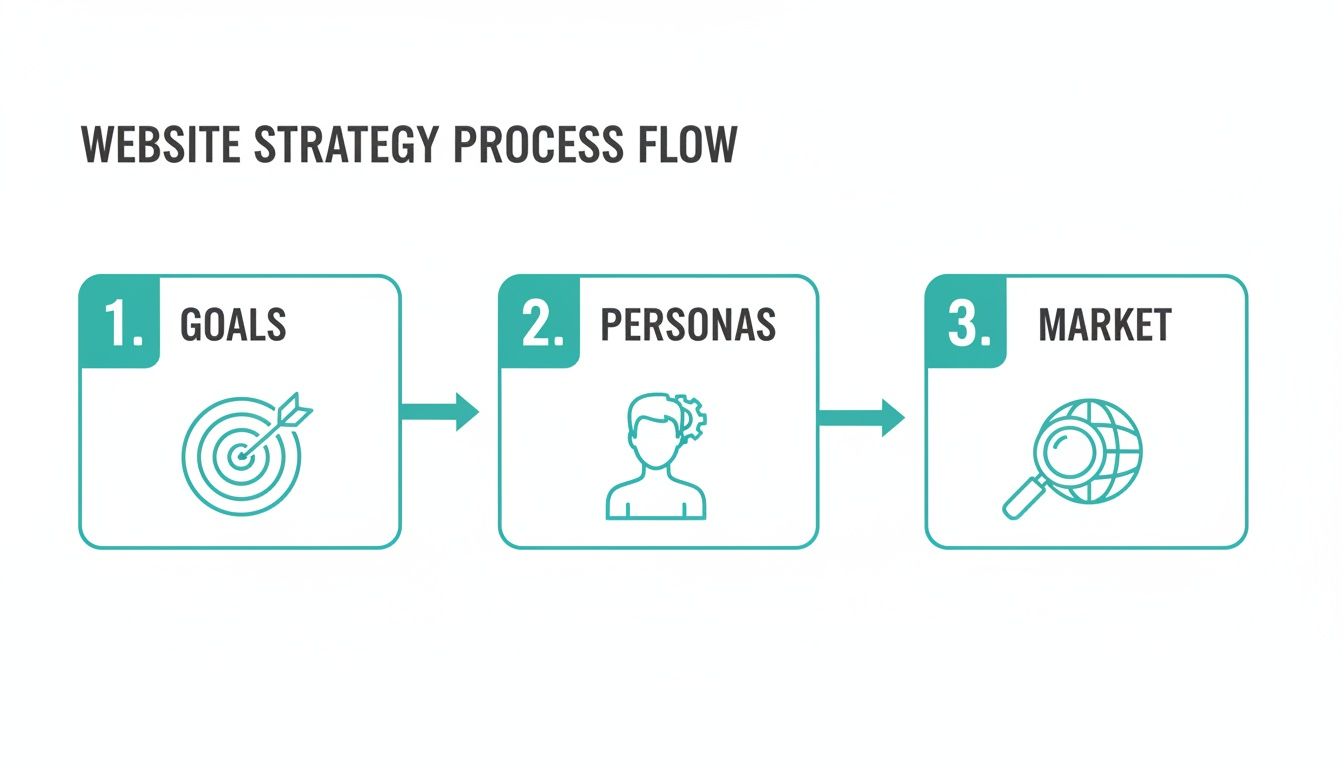
As you can see, it all starts with clear goals, is shaped by a deep understanding of your clients, and then gets sharpened by looking at what’s happening in the market.
Define Your Ideal Client Personas
Once your goals are locked in, the spotlight turns to the most important person in this whole equation: your ideal client. Basic demographic data like age or location is just scratching the surface. A truly effective website design for professional services is built for detailed, specific client personas.
Think of a persona as a semi-fictional character who represents your perfect client. Let's say you're a commercial law firm. A persona might be "David, the second-generation CEO of a manufacturing business."
What keeps David up at night? He's probably worried about compliance risks, messy employee contracts, and protecting his company’s intellectual property. He values efficiency, hates jargon, and needs to see proven expertise. He doesn't have time for vague marketing fluff; he wants direct answers and proof you've achieved results for businesses like his.
By deeply understanding a persona’s pain points, motivations, and what they value in a service provider, you can craft a website experience that speaks directly to them. Every headline, service description, and case study should resonate with their specific needs.
This level of detail makes critical design and content choices easy. For instance, knowing David is time-poor and values directness tells you the website needs a prominent "Book a Consultation" button, transparent service pages, and case studies that showcase real-world results for other manufacturing companies.
Analyse the Competitive Market
The final piece of your strategic foundation is figuring out where you fit in the market. A competitive analysis isn't about copying what other firms are doing. It's about finding opportunities to differentiate your practice and stand out.
Start by picking three to five of your key competitors and analysing their websites with a critical eye.
- Messaging: What’s their main value proposition? How do they talk about their expertise?
- User Experience: Is their site easy to get around? Can you find their services and team bios quickly?
- Content: What resources are they offering? (e.g., blogs, whitepapers, case studies) What topics are they owning?
- Trust Signals: How are they building credibility? Are they using testimonials, awards, or accreditations well?
This exercise will almost always reveal gaps in the market. Maybe your competitors all use stuffy, corporate language. That's your chance to adopt a more approachable, client-focused tone. Perhaps their websites are painfully slow on mobile—a golden opportunity for you to deliver a far better user experience.
This analysis ensures your website doesn't just blend in with the noise, but stands out as the obvious choice for your target clients.
Design an Architecture That Builds Instant Trust
In professional services, trust isn't just a nice-to-have; it's the currency of your business. Before a potential client ever reads a case study or picks up the phone, their first impression is forged by your website. A clunky, confusing, or outdated site is an immediate red flag. It quietly signals a lack of attention to detail, undermining your credibility before you even get a chance to make your case.
This is where thoughtful information architecture becomes your greatest asset. It's the blueprint of your site, dictating how everything is organised and how a visitor moves from one page to the next. For a law firm, a consultancy, or an accounting practice, this blueprint has one job: to make your expertise feel obvious and your reliability a given.

We're talking about more than just a navigation menu. A great site structure anticipates what a high-value client needs to see to feel confident. Can they find your team's credentials in two clicks? Is your track record laid out in clear, easy-to-find case studies? A transparent, logical site shows you have nothing to hide and that you respect their time.
The Non-Negotiable Pages for Professional Credibility
Every professional services website needs a core set of pages that work in concert to build a compelling argument for your firm. These aren't just filler content; they are vital touchpoints in a client's decision-making process.
Your site map should be built around these essential pillars:
- A Detailed 'About Us' or 'Our Firm' Page: This is your chance to tell your story. Go beyond the boilerplate mission statement. Introduce the real people who make your firm what it is—professional headshots are a must.
- Comprehensive Service Pages: Don't lump all your services together. Each core offering deserves its own dedicated page to detail the 'what', 'why', and 'how', answering key client questions before they're even asked.
- Proof-Driven Case Studies or a Portfolio: This is where you back up your claims. Showcase your work with specific client challenges, the solutions you engineered, and the measurable results you delivered. It's often the single most persuasive part of your site.
- An Accessible 'Contact Us' Page: Make it incredibly simple for people to reach out. Include a straightforward form, your phone number, email, physical address (with a map), and your business hours. Remove every possible barrier.
This foundational structure creates a seamless experience that guides potential clients toward the exact information they need to make a confident decision.
Weaving in Essential Trust Signals
Beyond the basic structure, your website needs to be layered with "trust signals"—the visual and written cues that reinforce your legitimacy. These elements work on a subconscious level, putting visitors at ease and validating their decision to consider you.
It's surprising how many businesses in the Australian landscape drop the ball here. Only 41% of small and medium businesses (SMBs) even have a website, while 75% of consumers say they prefer to buy from a business that’s online. For a law firm or real estate agency, that gap is a huge liability. You can dig into more of these fascinating Australian web design statistics on RockingWeb.
To stand out, you need to deliberately and naturally integrate these signals.
A great professional services website doesn't just state its expertise; it demonstrates it at every turn. Trust is built through transparency, proof, and a clear, client-focused narrative.
To help you get this right, here's a quick checklist of the trust-building elements that are simply non-negotiable for a professional services site. Think of these as the ingredients that turn a simple online brochure into a powerful client-acquisition tool.
Essential Trust-Building Elements for Your Website
| Element | Why It Matters | Implementation Tip |
|---|---|---|
| Client Testimonials | Provides genuine social proof from satisfied clients, making your claims far more believable than marketing copy ever could. | Use full names and company details (with their permission, of course) for maximum credibility. Video testimonials are even more impactful if you can get them. |
| Industry Awards & Accreditations | Offers third-party validation of your skills and reputation. It shows you're recognised by your peers as a leader in your field. | Display logos of professional associations or awarding bodies in your site's footer or on the 'About Us' page. It’s a subtle but powerful signal. |
| Professional Team Bios | Puts a human face to the name. It transforms your business from a faceless entity into a team of approachable, relatable experts. | Include high-quality, professional headshots (no selfies!), credentials, and a brief personal note or area of focus to help build a connection. |
| Clear & Professional Copy | Your writing is a direct reflection of your professionalism. Crisp, benefit-driven copy shows you understand your client’s world. | Write for your ideal client, not your industry colleagues. Ditch the jargon and focus on their problems and how you solve them. |
By thoughtfully weaving these elements into a clean, logical site architecture, your website becomes more than just an online placeholder. It transforms into a silent advocate for your firm, working 24/7 to convince your ideal clients that you are, without a doubt, the right choice.
Engineer Your Site for Conversion, Not Just Compliments
A beautiful website that wins design awards is one thing, but a website that consistently brings in new business? That's the real prize.
In the world of professional services, your site's primary job isn't just to look good—it's to turn a curious visitor into a qualified lead. This is where we shift our focus from aesthetics alone to strategic, conversion-focused design.
Every single element on your key pages, from the headline right down to the footer, has to work together to guide a potential client toward taking that next step. We're talking about transforming your website from a passive digital brochure into your firm's most effective and reliable business development tool. It’s all about engineering a user journey that naturally leads to a phone call, a form submission, or a booked consultation.

To make sure your website doesn't just collect compliments but actively generates leads, you need to implement powerful conversion rate optimization (CRO) tips that focus on user behaviour and data-driven improvements. This is the difference between a site that people like and a site that people hire.
The Anatomy of a High-Converting Service Page
Let's get specific. Your individual service pages are where the most important decisions are made. A visitor landing here isn't just browsing anymore; they have a specific problem and they're actively trying to figure out if you're the right person to solve it. A high-performing service page, therefore, is a masterclass in clarity and persuasion.
It all starts with a powerful value proposition right at the top. This isn't some fluffy tagline. It’s a crystal-clear statement telling the visitor what you do, who you do it for, and why you’re the best choice. For an accounting firm targeting startups, it might be: "Expert Tax & CFO Services for High-Growth Tech Startups. We handle the numbers so you can focus on scaling."
From there, the page should flow logically:
- Problem-Agitate-Solve: Clearly spell out the specific pain points your ideal client is facing right now.
- Process Overview: Briefly explain your methodology. How do you actually deliver your service? Give them a peek behind the curtain.
- Social Proof: Sprinkle in relevant testimonials or snippets from case studies that back up your claims.
- Clear Call-to-Action (CTA): End with a direct, compelling instruction. Don't be vague.
This structure smoothly moves a visitor from understanding their problem to seeing you as the undeniable solution.
Primary vs. Secondary Calls-to-Action
Here’s a reality check: not every visitor is ready to "Book a Consultation" the moment they land on your site. Recognising this is crucial for effective website design for professional services. This is precisely why you need a mix of primary and secondary CTAs.
A primary CTA is your main goal—the high-commitment action you want users to take. These are for visitors who are hot and ready to engage.
- Book a Consultation
- Request a Proposal
- Get a Free Assessment
A secondary CTA, on the other hand, is a lower-commitment offer. It’s designed for visitors who are interested but need more information before they’re ready for a conversation.
- Download Our Free Guide
- Subscribe to Our Newsletter
- Watch Our Case Study Video
By offering both, you capture leads at different stages of their buying journey. The person who downloads your whitepaper today could easily be the one booking a consultation in three months. Without that secondary CTA, they might have simply left and forgotten all about you.
Mobile-First Design Is Non-Negotiable
Think about your ideal clients—executives, business owners, decision-makers. They're constantly on the move, checking emails between meetings and researching service providers on their phones. If your website delivers a clunky, frustrating experience on a mobile device, you are losing business. Full stop.
This is why a mobile-first design approach is essential. It means you design the mobile experience first and then adapt it for larger screens, not the other way around. This ensures the most critical information and CTAs are front and centre for the majority of your users.
Slow loading times are another massive conversion killer. Research shows that even a one-second delay in page load time can cut conversions by 7%. For professional services, where credibility is everything, a slow site feels unprofessional and untrustworthy. Prioritise optimising images, streamlining your code, and using quality hosting to ensure your site is lightning-fast and responsive, no matter the device.
Lay the SEO Foundations to Attract the Right Clients
A beautiful, expensive website that nobody ever sees is a wasted investment. For your new site to actually generate business, it has to show up when potential clients are actively looking for the solutions you offer. That’s where Search Engine Optimisation (SEO) comes in, and it's far less about technical trickery than it is about strategic clarity.
For a professional services firm, good SEO isn't about gaming the system. It's about meticulously aligning your website's content and structure with the real-world questions and pain points of your ideal clients. When you get this right, your firm becomes the clear, logical choice when a high-value prospect searches for the exact expertise you provide.
Start by Speaking Your Client’s Language
Before a single word of copy is written for your service pages or blog, you have to get inside your clients' heads. You need to know the exact phrases they're typing into Google. This discovery process, known as keyword research, is the absolute bedrock of a successful SEO strategy.
You might describe your service as "bespoke wealth management," but your ideal client is more likely searching for "superannuation advice for doctors" or "how to set up a family trust". This gap between your industry jargon and their everyday language is where countless firms lose out.
A solid keyword research process looks something like this:
- Brainstorming: Begin with the obvious, broad terms for your services. Think "commercial lawyer," "business accountant," or "IT consulting." These are your seed keywords.
- Digging Deeper with Tools: Platforms like Ahrefs or SEMrush are brilliant for this. They take your seed keywords and uncover thousands of related phrases, show you how many people search for them each month, and give you an idea of how hard it'll be to rank for them.
- Hunting for Intent: This is the most important part. You're looking for "long-tail keywords" – longer, more specific phrases that signal someone is ready to make a move. "Best conveyancer for first home buyers" shows a lot more purchase intent than just "conveyancer," doesn't it?
This research hands you a strategic roadmap. It guides how you write every page title, heading, and paragraph to ensure you're meeting a genuine, existing demand from the market.
Weave Your Keywords into the Website Naturally
Once you have your list of target keywords, the art is in integrating them into your website so that everything reads naturally for people while sending all the right signals to search engines. You want to show your relevance without ever sounding robotic or "stuffing" keywords where they don't belong.
For each of your main service pages, focus on these high-impact spots:
- The Page Title (or Title Tag): This is the blue link people see in Google search results. Make it compelling and lead with your main keyword. For example: "Expert Business Valuations | Adelaide Accounting Firm".
- Headings (H1, H2, H3): Your main on-page heading (the H1) absolutely must contain your primary keyword. Use your subheadings to break up the content with related secondary keywords.
- The URL: Keep your URLs clean and descriptive. Something like
yourfirm.com.au/services/commercial-property-lawis perfect. - Your Copy: Naturally mention your primary keyword and a few variations throughout your text, especially within the first 100 words. But remember the golden rule: always write for humans first. The keywords should just slot into clear, helpful sentences.
SEO isn’t a one-and-done task; it’s an ongoing process of proving your expertise. The technical setup gets you into the game, but it's the consistent quality of your content that ultimately helps you win.
Getting these fundamentals right is critical, but the fierce competition in professional services means you'll likely need deeper expertise. To make sure you're getting the right help, it’s vital you understand how to hire an SEO consultant effectively and avoid the cowboys.
Create Content That Proves Your Authority
Beyond just optimising your core service pages, the single best way to attract high-value clients is by proving you're the expert. You do this by creating genuinely helpful content that answers their most pressing questions, long before they're ready to pick up the phone.
This strategy shifts you from being a salesperson to a trusted guide. Think about creating in-depth articles, guides, or detailed FAQ sections that tackle common problems head-on. If you’re an architectural firm, an article on "Navigating Council Approvals for Commercial Developments" would be invaluable. For a law practice, a detailed guide to "Key Considerations in a Shareholder Agreement" establishes instant credibility.
This approach pays off in two powerful ways. First, it captures the attention of clients who are still in the early research phase, building your brand as the go-to authority. Second, it gives Google a mountain of relevant, expert content to index, signalling that your website is a comprehensive resource on the topic – a massive factor in achieving those coveted top rankings.
Launch, Measure, and Refine for Long-Term Growth
Hitting ‘publish’ on your new website feels like crossing the finish line, but in reality, it’s the starting gun. The best websites for professional services firms aren't just digital brochures left to gather dust; they're living, breathing assets that need to be nurtured. Your launch is simply the beginning of a new phase—one driven by data.
This is where you stop guessing and start knowing. Instead of assuming which services resonate most or what content your ideal clients crave, you can use real-world data to make smart decisions. This process turns your initial investment into an engine for genuine, sustainable growth.
Set Up Your Measurement Toolkit
First things first: you can't improve what you don't measure. Before you do anything else post-launch, you need to get the right tools connected. There are two free, non-negotiable platforms from Google that should be set up from day one.
These tools are your eyes and ears, giving you the raw data needed to understand how people find you and what they do when they get to your site.
- Google Analytics 4 (GA4): This is your window into on-site behaviour. GA4 shows you which pages people visit, how they navigate through your site, and—most importantly—whether they take the actions you want them to, like filling out a contact form.
- Google Search Console (GSC): Think of this as your direct line to Google. GSC tells you which search queries are bringing people to your site, flags technical errors that could be hurting your search ranking, and gives you a clear picture of your visibility on Google Search.
Getting them installed is just the first step. The real magic happens when you start interpreting the data to guide your next move.
Identify and Track Your Key Performance Indicators
With your tools in place, you need to know what to look for. Forget vague metrics like "more traffic." High-growth firms focus on Key Performance Indicators (KPIs) that tie directly back to business goals.
For any professional services firm, your main KPIs should centre on generating high-quality leads.
- Conversion Rate: This is the big one. What percentage of your visitors actually complete a goal, like submitting your contact form? A low conversion rate, even with high traffic, is a sign that something is wrong.
- Lead Quality: Are the enquiries coming from your ideal clients, or are they time-wasters? You can track this by simply reviewing the submissions and noting their quality over time.
- Top Performing Pages: Dig into your analytics to see which service pages or articles are pulling in the most engaged visitors and driving the most form submissions.
- User Engagement: How are people really using your key pages? Heatmap tools can be brilliant here, showing you exactly where people click, scroll, and linger, revealing what’s catching their eye and what they’re ignoring.
Your data tells a story about what your clients truly value. A high bounce rate on a critical service page might mean the copy is confusing or isn't connecting. A surprisingly popular blog post could signal a topic you need to double down on. Listening to this feedback is the key to refinement.
Create a Simple Maintenance and Content Schedule
A website that’s never updated becomes stale, vulnerable, and invisible to search engines pretty quickly. A simple, consistent schedule for maintenance and new content keeps your site secure, relevant, and working hard for you. An effective website design for professional services plan must always include this post-launch activity.
This doesn't have to be a massive chore. A basic monthly or quarterly routine is often all it takes to stay on top of things and protect your investment.
Your Ongoing Growth Checklist
| Task Category | Frequency | Key Activities |
|---|---|---|
| Technical Maintenance | Monthly | Update plugins and your core CMS (e.g., WordPress). Run a full site backup. Check for any broken links flagged in Google Search Console. |
| Performance Review | Quarterly | Dive into your KPIs in Google Analytics. Look for trends, review your most popular content, and identify underperforming pages that need a refresh. |
| Content Creation | Monthly or Quarterly | Publish a new piece of authoritative content. This could be a detailed blog post or a client case study targeting a keyword from your research. |
This cycle of launching, measuring, and refining is what transforms your website from a static expense into a powerful, ever-improving asset for your business. It’s how you stay visible, build credibility, and consistently attract the high-value clients you're built to serve.
Got Questions? We've Got Answers
Stepping into a new website project always kicks up a few questions. It's a big investment, and you need clear, honest answers to move forward with confidence. We've pulled together the most common things we get asked by professional services firms just like yours.
What's the Real Cost for a Professional Services Website in Australia?
You'll see a pretty wide range out there, but for a high-quality, custom-built website for a small-to-medium professional services firm in Australia, you should budget somewhere between $3,000 and $8,000 AUD. It's worth noting this is often 15-25% higher than what you might see quoted in the US, which comes down to our local market and labour costs.
If your firm is larger or needs more complex features—think client portals, intricate software integrations, or moving a massive amount of content from an old site—the investment can easily push past $15,000 AUD. The key is to stop thinking of it as a marketing line item and start seeing it as a capital investment in a business asset that will pay you back for years.
How Long Does This Whole Process Take?
From our first strategy session to the day we go live, a realistic timeline is about 6 to 12 weeks. This isn't a hard-and-fast rule, though; the schedule really hinges on a few things:
- Design Complexity: A simple, clean site is faster than one with all the bells and whistles. More custom features mean more development time.
- Content Readiness: This is, without a doubt, the biggest cause of project delays. If we're waiting on you for text and images, the whole timeline stalls.
- Your Feedback Loop: The faster your team can provide clear, consolidated feedback, the more momentum we can maintain.
Having a solid project plan from the get-go and a single point of contact on your side makes a world of difference in keeping things on track.
Honestly, the best website projects are genuine partnerships. When a firm is engaged, gives feedback promptly, and is crystal clear on its goals, the whole process is smoother, faster, and the final website is always leagues better.
Can I Handle Website Updates Myself After It's Live?
Yes, you absolutely should be able to. Any website worth its salt today is built on a user-friendly Content Management System (CMS) like WordPress. A good CMS means you can handle day-to-day changes yourself, no developer or coding skills required.
You should have the power to easily:
- Tweak the text on any page.
- Add a new team member's profile.
- Publish a new article or insights piece.
- Upload new case study images.
Any decent agency or designer will include training as part of the handover. We make sure our clients feel totally comfortable managing their own content from day one.
What's More Important: The Design or the Content?
Ah, the classic chicken-and-egg question. But it’s a false choice—they're two sides of the same coin. One is useless without the other.
Think about it: a stunning design with vague, unhelpful content won't build an ounce of trust or explain why you're the right choice. On the flip side, the most brilliant, persuasive content will be completely ignored if it's stuck on a clunky, outdated, or confusing website.
The magic happens when you merge the two. An effective website design for professional services marries a clean, trustworthy aesthetic with sharp, client-focused copy that solves their problems and presents your firm as the obvious solution.
Ready to build a website that does more than just look the part? At Frank Digital Agency, we build websites that become your firm's hardest-working business development tool. Explore our web design services and let's talk about what's possible.
Article created using Outrank